

GoedWare 15 Devlog
As is common for me, this is very different than the game I planned to make. The original plan was creating an “abstract cinematic-type game” in GDevelop. I don't want to spoil the plot, since I still want to try and finish it at this point, but while much of the game was finished and working, there was one scene that needed to be made in 3D. While I had made a 3D scene in GDevelop once before, some of the features seemed to have changed since then and there were too many issues to resolve with only two days left, so I decided to swap to a one room escape game in RPG Maker since I knew I could make one fast in that engine with minimal potential for issues.
I pretty quickly thought of a premise of a stereotypical RPG hero who wakes up after a night at the inn and discovers that his jealous party members had locked him in his room so they could defeat the dragon themselves. I ended up deciding to call the hero Hero and his party members Mage, Lancer and Priest to keep the characters and characterization as simple as possible. Within a couple hours I had created a first draft map of the inn room, most of the intro dialog except for the tutorial and a draft of the ending.
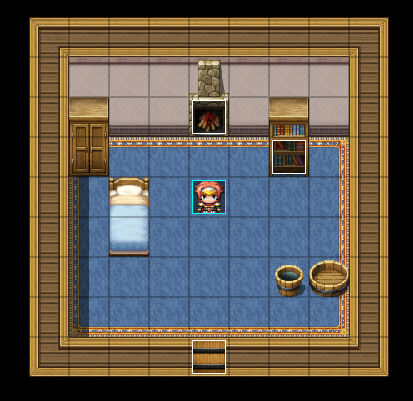
With the “hands on” gameplay all set to start, I suddenly realized I didn't know what items or puzzles I would be creating, other than using the note left by Hero's companions to restart the smoldering fire.
I started typing some ideas. The only additional idea I had was the possibility of multiple endings- one out the door, one out the window (a bad end) and one joke end where he tries to climb the chimney and has to be rescued by Santa Claus. With no other ideas, I debated playing some room escape games for inspiration, but decided I really just needed a break for the night.
The next day, I scrapped the overly complicated idea of multiple endings and focused figuring out how staring a fire and boiling something could help Hero escape. I decided on the strange, yet straightforward solution of boiling a potion capable of unlocking doors. Every other puzzle or found item would either be a potion component or directly related to acquiring one. The one exception would be the book with the recipe.
My next step was to work on setting up common events that would be triggered when characters stood in certain spots and interacted with the correct items in the inventory. In past games, I had used if statements on the events the player needed to interact with, but had been wanting to experiment with allowing the player to interact directly with inventory items. Besides being a bit more “unique,” it saved me worrying about using as many variables to test whether something was present because you couldn't even trigger the event unless it was in your inventory to begin with.
Here's a screen shot of one of the events along with the general logic in psedocode:
get player X coordinate
get player Y coordinate
if player on right spot:
trigger event;
delete object (to prevent even being retriggered);
exit event;
else
call the common event that tells the player the item can't be used there
(The one exception to this format was the potion book, that could be read anywhere at any time and did not need to be deleted.)
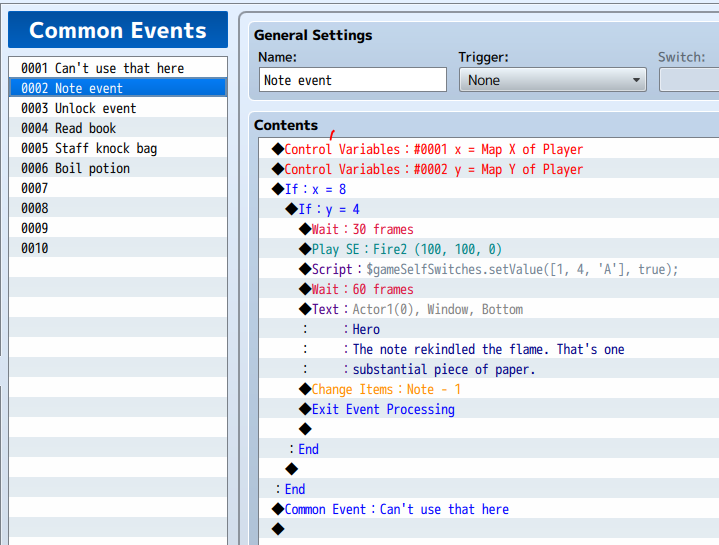
One hitch I ran into creating the common events is that apparently RPG Maker's XY coordinates are inverted compared to the graphs we learn in math class (X is the vertical axis and Y is the horizontal axis). In other words, 0,0 is at the top left instead of on the bottom left. Supposedly, this is common in game engines, but pretty frustrating if you don't know it and it took a lot of variable testing to figure out what was up.
Another important component I added was the option to pull up the inventory with one key. The default way is to pull up the menu and then select the inventory, which is pretty fast, but since selecting and using inventory items is one of the game's main mechanics, accessing the inventory should be as efficient as possible. I had seen other RPG maker games that allowed players to open the inventory by pressing "i". I looked up how to do that and saw it might require a plugin and some special code I did not want to worry about learning. So I rechecked RPG Maker's default bound keys and saw Shift was one of them. Since Shift is a common key in games and did not control any default mechanics, I set up a parallel event that opens the inventory with Shift, along with a "menu" sound effect since the effect was not triggering by default.
With the commons events and inventory shortcut working, it was time to tying them to the items. To keep my head straight, I started typing down each item I needed to make and what it did in the form of a check list. After the jam, I realized I forgot about the check list immediately after making it, but writing it at the time did help me establish what items I was creating/what steps I needed to take to finish the game.
While setting up the format of common events, I also settled on a final version of the map, adding windows, moving the bucket and wash basin below the bed, and setting up a table and chairs where it had been. On the final day, I added the lamps too have something "moving" on the map beyond the faint fire and slowed down their default animation speed to better fit the relaxing ambience I was aiming for.
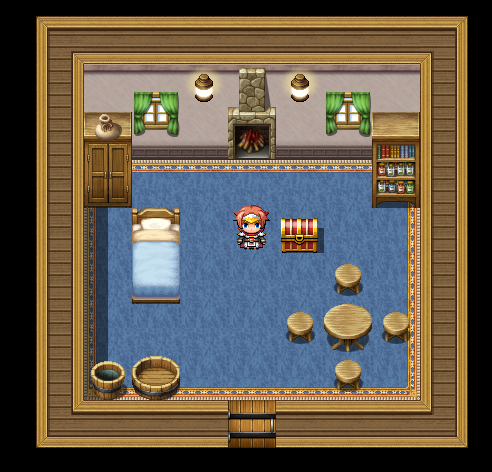
Since the room is so small and designed to be examined, I set every item except the lamps and the stool to be interactive. I tried to make sure each item was either important to a puzzle, characterized the party, or at least gave some useful info or a funny comment. Since I literally made the party stereotypes, it was pretty easy to insert minimal characterization like Mage knows a lot of magic, Lancer is a rival to Hero and a bit harsh tongued, Priest is humble and cares about his party members. Initially, interacting with the wash basic just prompted Hero to say "It's a wash basin. I don't need to use it," but later decided to use it to prompt Hero to recall a humorous story implying some playful bantering in the party, to show they really did all care about each other. This ended up being a good counter to interacting with the table, which causes Hero to recall their final conversation the night before, his companions complaints about being taken for granted, Hero's inability to take them seriously and that he now realizes he should have.
In the final hours of the jam, I worked on adding some polish. Having the bag move down one square after falling off the cabinet, some sound effects I had not thought to add in before, and finishing the tutorial. Usually the "tutorials" in my RPG Maker games are just one sentence at the beginning of the game stating which keys advance the text and then another at the end stating which keys move the player, open menu, etc.. But since I had a more complicated inventory mechanic, I added an option to hear an example of how to use an item and an option to skip the entire tutorial if someone was confident/already played the game.
So in closing, I do like the game I made and learned a lot. I'm glad I "risked" taking the time to learn how tie common events to items when interacting with certain spots on the map and feel this mechanic will be useful in future games. I have some minor post jam plans, like making the player add each potion item one at a time (as is, each of the four items required to activate brewing the potion have the same common event that will trigger if all four items are present because that was the fastest least bug risking way). Also would like to have the tutorial walk the player through the optional explanation on how to use inventory items instead of just having a text explanation, and I want to incorporate some of the suggestions of my fellow jammers like fixing the message on the bed so interacting with the pillow will not deter people from interacting with the bottom of the bed where an item is hidden.
Thanks for reading! :)
Leave a comment
Log in with itch.io to leave a comment.